Your Yamaha MODX M Can Follow the Drummer?! 🎹+🥁
If you're a Yamaha MODX M owner, there's a good chance you're already aware of how capable this remarkable little keyboard is.
It's lightweight, powerful, flexible, and packed with features that can be incredibly useful for live performers.
But every once in a while, you stumble across a feature that makes you stop and think:
"Wait… it can do THAT?"
This is one of those features.
The MODX M Can Follow an External Tempo
One of the really interesting things you can do with the Yamaha MODX M is use an external audio source to control the tempo of things happening inside the keyboard.
That means this will work with something like a pattern, song, or arpeggio playing inside your keyboard.
Instead of simply running at a fixed tempo, the MODX M can respond to the rhythmic information coming from an external source.
For example:
Your drummer.
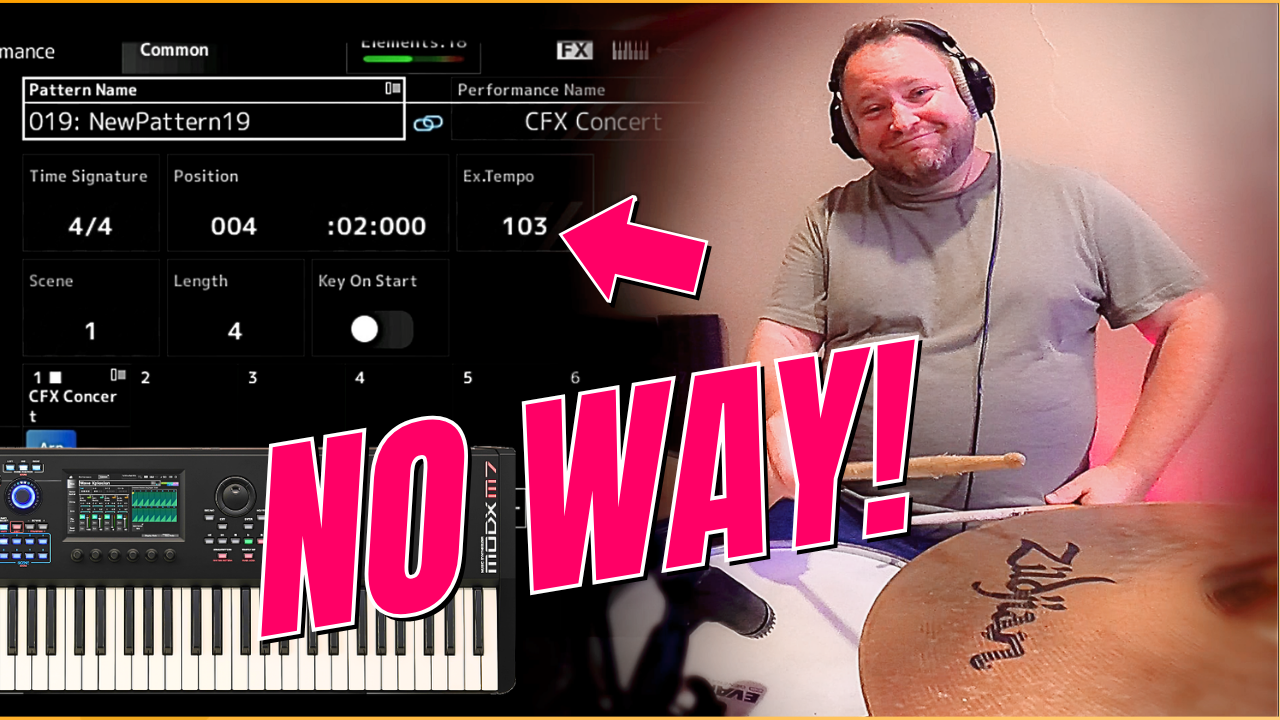
Imagine you've recorded a pattern into your MODX M at 103 BPM.
Normally, that pattern is going to play at 103 BPM.
But what happens if your drummer speeds up?
Slows down?
Or simply isn't playing to a click?
That's where this feature gets interesting.
Here's How It Works
For my demonstration, I started with a simple piano sound using the CFX Concert piano.
I then created a pattern based on the intro to a Dolly Parton song and recorded it at approximately 103 BPM.
Once the pattern is recorded or loaded into the MODX M, you can access the keyboard's Play/Record functionality and select the pattern you want to use.
From there, we go into the keyboard's Click Settings.
This is where you'll normally see the tempo. In this case, I set it to 103 BPM.
You can adjust that tempo manually, just as you would expect.
But there's another option waiting for you in the settings.
A/D In.
The A/D refers to the keyboard's Analog/Digital input.
This allows the MODX M to receive an external audio signal.
This feature has been on several previous Yamaha products and has been used to do things like record samples, attach a vocal mic directly through the keyboard, or possibly trigger a vocoder sound.
That signal can now also be used to influence the tempo.
Using a Microphone to Trigger the Tempo
For my demonstration, I used an SM57 microphone connected to the keyboard.
The microphone was positioned on my drum kit to pick up the rhythmic information coming from the drums.
The connection is straightforward:
Microphone → XLR to ¼-inch cable connection → MODX M7 A/D Input
Once the AD input is configured as the sync source and activated, the MODX M begins responding to the incoming rhythmic signal.
Instead of simply saying that my keyboard is going to play the pattern at 103 BPM, the keyboard is effectively listening to the outside source and responding to its timing.
That's pretty cool.
Why Would You Actually Use This?
Now, I'll be honest.
This isn't something I personally expect to use very often.
I play with a lot of different groups and musicians, and adding another layer of complexity to my live setup isn't necessarily something I want.
But that doesn't mean this feature isn't really useful.
In the right situation, it could be an incredibly valuable tool to have at your fingertips.
Maybe you're playing with a drummer who doesn't use a click.
Maybe you're incorporating programmed elements into your live show.
Maybe you have a pattern or sequence that absolutely needs to stay connected to the live rhythm section.
Or maybe you're simply experimenting with ways to combine electronic and acoustic elements on stage.
That's where trying something like this could become very interesting.
The Bigger Lesson
This is actually one of the things I love about modern keyboards.
There's an incredible amount of technology sitting underneath the hood.
The problem?
Most performers don't use most of it.
Not because they don't want to.
They just don't know it's there.
That's why I think it's worth occasionally digging through your keyboard's menus, manuals, settings, and features.
You might discover something that completely changes the way you approach your performance.
And this MODX M feature is a perfect example.
It potentially works with all of these things:
- Recorded patterns
- Songs
- Arpeggios
- MIDI files
An external signal could help you control the timing for all of them.
Pretty cool.
Don't Forget What Really Matters
There's a danger with technology and performers. I see this a lot with keyboard players in particular.
We can get so fascinated with our equipment that we forget why we're using it in the first place.
Your current keyboard probably has amazing sounds.
Your performances, songs, patterns, and MIDI files, are all perfectly synchronized and play exactly the way you want them.
You have incredible sounds, effects, sequences, arpeggios, samples, lighting cues, backing tracks and technology all working together.
But none of that is the performance.
YOU are the performance.
When you walk onto a stage, people aren't coming to watch your keyboard.
They come to experience you.
They want to hear you.
They want to see you.
They want to feel something.
They want to be entertained.
The technology should support that experience, not replace it.
Your Audience Doesn't Care How Cool Your Keyboard Is
This is something I think every live performer needs to remember.
You might be incredibly proud of a complicated keyboard setup.
You might have spent hours programming your sounds.
You might know every shortcut, every menu and every hidden feature.
And that's fantastic.
But your audience doesn't really care.
They care about the experience you create for them.
That's why I always encourage performers to think beyond the gear.
Sure.
Learn your keyboard.
Learn your gear.
Experiment.
Find cool stuff.
But then take all of that technology and use it to make your performance better.
Not more complicated.
Not more impressive to other musicians.
Better for the audience.
Be the Performer
The Yamaha MODX M is capable of some pretty impressive things.
This external tempo-sync feature is just one example.
Regardless of the gear you own, I encourage you to experiment with it and find practical uses for it in your own setup.
But while you're exploring all those menus and features, remember the bigger picture:
Your equipment is a tool.
But, YOU are the performer.
Ultimately, the goal isn't to show people how much your keyboard can do.
The goal is to create an experience that they will remember.
Be the Performer You Are Meant to Be!
Join us to start performing with confidence, purpose, and fun... one email at a time.
When you signup, you will get regular email updates with free content and product offers.